
This post is an introduction on how to patch an executable in x64dbg. Patching is changing or modifying the assembly instructions to improve the executable, fix problems or modify it to do something differently. This is a simple C program to add two numbers in a function and print out the result. Here is the assembly code for this program:
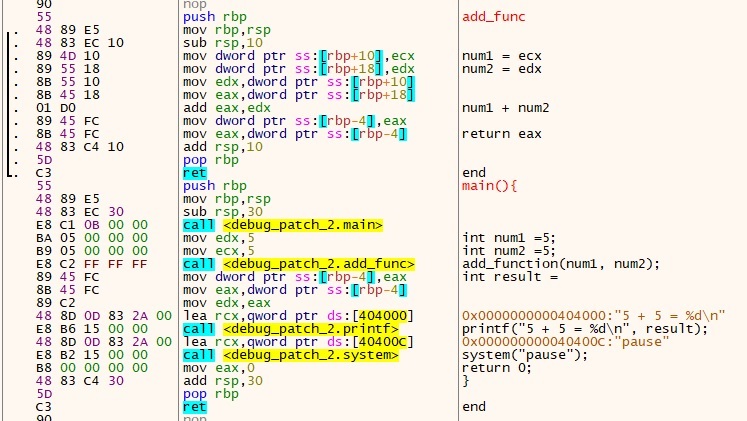
The main method on the bottom and the add function on the top. When the program is complete the output is as follows.

Saving a Patch
Saving a patch is easy, when you are done modifying the assembly go to File – Patch File. A selection of modifications appear which you have made to the file, select the modifications you want by clicking the checkbox or press Select All button and click Patch File allowing to save the file as a new executable.

Patching step 1
The first patch I want to make is rather than add too variables in the function we multiply and return the new value to the printf statement. This is a fairly simple operations as all I have to do is change the add instruction to a multiple instruction, which in assemble its imul.
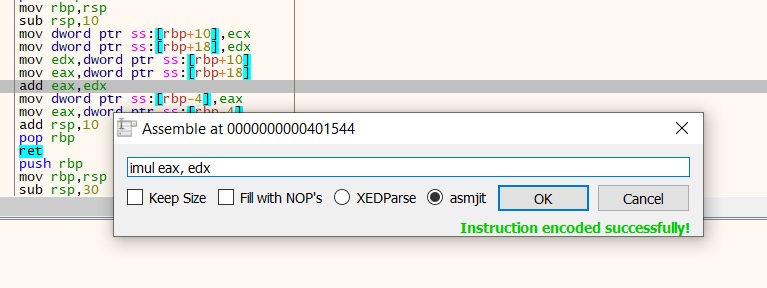
Select a line of assemble and click on the spacebar to modify an assemble instruction. I save my new patch and run the program this time instead of 10 as the answer we have 25.

The last thing we need to do is change the plus symbol to a multiply simple in the output. We go back into the assembly. Click on where the text is stored, and right click Follow in Dump.
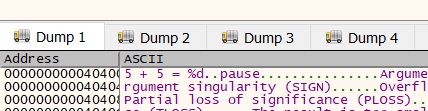
To modify the value select the plus symbol and press the spacebar to change it. In hex the “x” is 78.

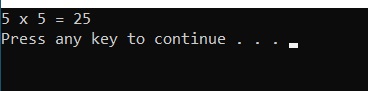
Save the patches again and run the program, we have the following output:
Patching Step 2 and Step 3 will follow in the coming posts.
 ThreatBlogger