
Inline assembly is a way to embed a block of assembly code directly into a C/C++ program. Inline assembly has many uses such as improving program speed, reducing memory needs and controlling hardware. It’s possible on most compilers to include assembly code inside your source code because the inline assembler is built into the compiler. The syntax will differ between compilers and assemblers, we will describe here the Intel Syntax and the At&t Syntax.
You use the asm keyword when using assembly, Intel uses _asm_(“ “) and AT&T uses asm(“ “).
Intel Syntax
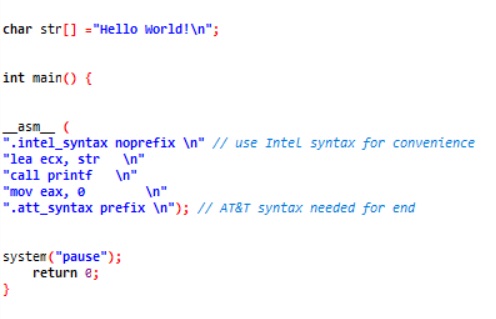
The Intel Syntax is different than the At&t syntax because operand order is reversed. The Intel Syntax is clearer to understand and easier to write. Both syntaxes can be mixed by using the assembly keyword .intel_syntax noprefix and .att_syntax noprefix. But when doing so, you need to restore the AT&T setting at the end of every inline assembly block.
Here is a Hello World example which outputs to the console using the Intel Syntax.
This next piece of code will product a Hello World Messagebox to the screen.
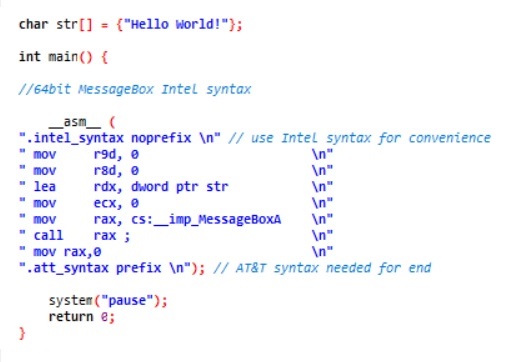
The Intel syntax in your asm block is converted to AT&T syntax by the compiler, after which it is inserted in the compiled source.
AT&T Syntax
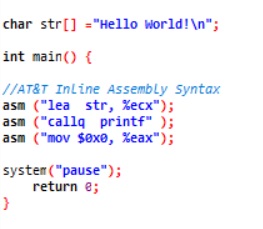
The AT&T Syntax is traditionally used in Unix-like operating systems. It can be used on the x86 and x86-64 platforms. The operand order for instructions is source and then destination. Register must be prefixed with a % character and constants must be prefixed with the $ character.
Here is a sample which outputs a Hello World message to the console.
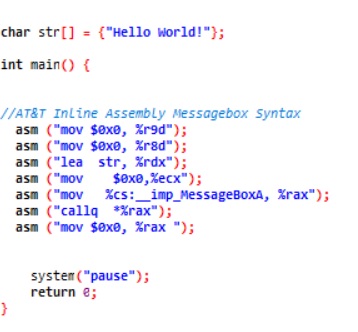
This example displays an Hello World Messagebox to the screen:
 ThreatBlogger