
In this post we will look at Packers, which are tools used to hide malicious files by encrypting and compressing the file to make the code unrecognizable allowing it to bypass antivirus software. I will explain how packers work and look at the different types of packers. There are ways to unpack malware, we will look at how this process is accomplished and the tools used to achieve it.
What are Packers
- The term “packed” can refer to any file which and been compressed or encrypted.
- A Packer or “runtime packer ”is a special tool designed to automatically decrypt itself and executes its payload in memory, allowing it to avoid detection and analysis by security researchers and antivirus products.
- Packers make it harder to analysis malware by security researchers, by not been able to identify the behaviour of the malware, and the increased amount of time required to for analysis.
Packing
- Packing, a.k.a “Executable compression” is a means of compressing an executable file and combining the compressed data with the decompression code into a single file.
- Packing has been used for many years to bypass security vendors and antivirus products. This type of malware is usually known as polymorphic malware, as the packing application can repackage the same executable file, creating different MD5’s which are distributed to victims, so static signatures become useless.
- When an executable is packed an encoded version of the malware can be stored in a variable, possibly encoded with a key. At execution time, the program generates a key and decodes the malware. The malware is loaded into memory, the program is unpacked and then jumps to the address and executes the malicious payload.
How Packers Work
- A packer is simply a tool to armour the binary. The whole binary is protected. The more advanced organizations or cybercriminal groups may employ custom packers or implement protection inside malicious files.
- The original executable is compressed / encrypted, then wrapped in a new executable which contains code to bring it back to its original state.
- When packers encrypt or compress a file, a stub is also created. This stub is a piece of code that contains the decompression or decryption routine.
- Once the file is running, the decompression stub stored in the packed file will decompress the packed section. The original .exe file is then loaded into memory than executed.
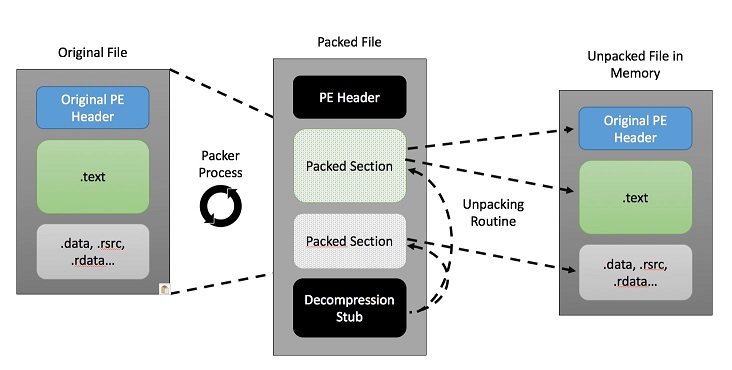
- The packer produces its own header Section. This PE Header can be modified by scrubbing out information or changing information making it harder for Malware Analysis’s to identify the packer and determine its correct size.
Different Types of Packers
There are many different types of Packers:
- Commercial Packers: UPX, PECompact, MPRESS, Exe Packer 2.300, ExeStealth, ASProtect.
- Modified Packers: These are packed with common packers but the executables is modified so not to be detected by antivirus products.
- Mult-iPacked: Files that have been packed several times, using a variety of packers.
- Unknown Packers: Files that have been compressed by packers that are rarely encountered – for example, packers that demonstrate a proof of concept.
- Custom Packers: Use proprietary algorithms to bypass standard detection techniques. Many of the emerging custom packers are polymorphic, which simply means that they use an anti-detection strategy whereby the code itself changes frequently, but the purpose and functionality of the malware remains the same.
Unpacking Malware
Unpacking is the process of restoring the original malware executable. Until we unpack a malware file, we cannot see even the basic functionalities and attributes of the packed file like strings, imported API’s or exports of a file. In this section we will look at techniques and tools to unpack malware.
Contents of a Packed File
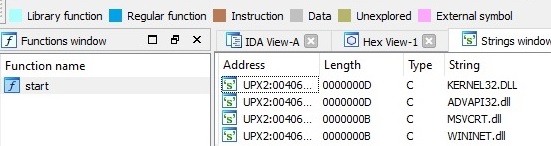
Looking at a packed file in IDA Pro, we can see the contents of the file are encrypted and unreadable.

There is only one function available, the start function and the strings show the most common used API strings. You can also spot under Address this file is packed with UPX.
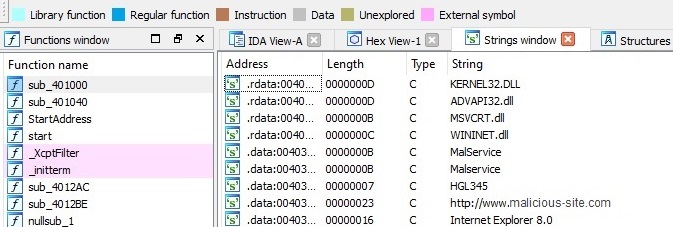
Looking at the unpacked file in IDA Pro we can see more functions, plus more strings are available. We can see from the strings this file is indeed malware.
Monitoring unpacking with ProcMon
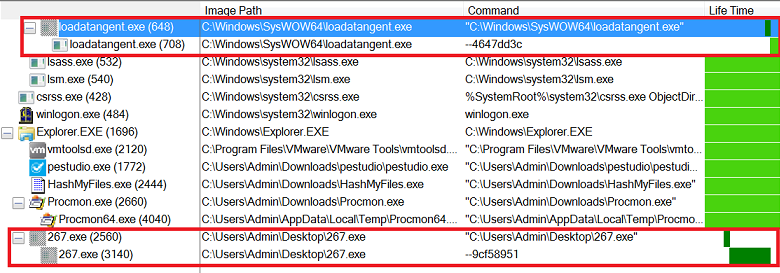
One technique to monitor the unpacking of a piece of malware on a system is to use Process Monitor (ProcMon). ProcMon records filesystem activity on the machine it is show any new processes which have been created. A piece of packed malware on the system is called creates a new process, this is the child process with the same name. The new child process is then allocated free space within it by the parent process. The unpacked code is then injected into the free space within this newly created child process, this is called process injection.
User protection against Packed Malware
Packers are not inherently bad, they help to protect files, data and applications. They are a great resource for Malware developers helping to obfuscate file code making it difficult to detect and be analyzed. Although unpacking a suspicious file is normally beyond most users, here are some helpful measures you can take:
- Have anti-malware software on all your devices, having it updated can help protect you against suspicious packers.
- If the file is packed with UPX a simple solution is to download UPX and using the following command line the file can be unpacked: upx -d -o unpacked.exe packed.exe
- If a file is packed by an unknown vendor or one of those vendors mentioned above, the best course of action is to delete it. If the packed file comes from an unknown vendor or untrusted website and you are suspicious of it, again the best course of action is to delete it.
 ThreatBlogger